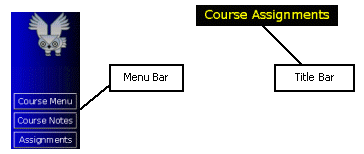
Once you log in, you can begin using OWL. Every screen you see will have the following elements in common:
The Menu Bar (with our lovely OWL mascot at the top) contains buttons that allow you to move around the system. Once you log in, the menu bar changes from providing only the Help and Login Help buttons, to providing buttons to access other parts of the system. Depending on where you are in the system, the available buttons may be different.
The Title Bar tells you exactly where you are in the OWL system, whether viewing Assignments or the Unit Menu. As there are a number of different pages in the system, you may occasionally lose track of your "whereabouts." If this happens, simply scroll up to the top of the page and take a quick glance at the title bar.
Menu bar buttons and Page titles
Section headings and column headings
Links in the system
Links to other parts of this manual
Text that you enter
OWL keeps track of where you are in the system. If you use the "Back" button on your browser, you can mess up OWL’s tracking. You should use the supplied menu bar buttons and links to move about the system.